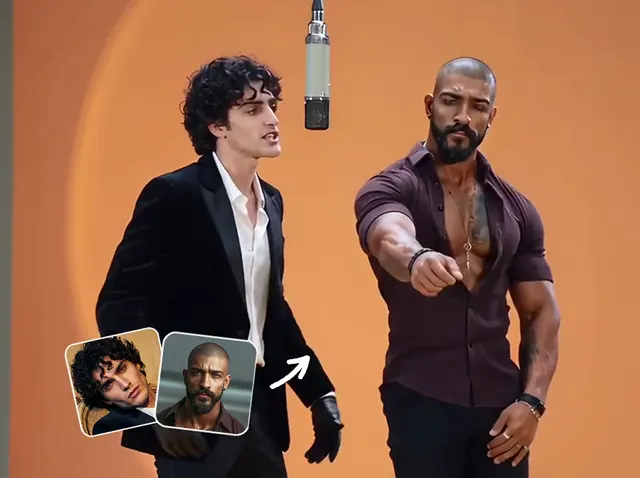
Two photos. Your duo.
Hotel Lobby AI Video Generator
Put two people into the orange studio performance with Hotel Lobby AI. Upload a photo for each side, choose a clip length, and turn your pairing into a video with the original soundtrack.
Two photos · 5, 10 or 15 seconds · 720p MP4 · 16:9
Reference performance · preview with sound
How to do Hotel Lobby trend videos
The Hotel Lobby AI generator prepares the scene and movement. You choose the cast and duration; no prompt or video upload is needed.
- 01
Choose the left and right performers
Add one clear photo per person. The first image goes on the left and the second on the right. Use Swap before generating if you want them the other way around.
- 02
Pick a model, length and credit amount
Choose Seedance 2.0 Mini, Fast or Pro, then pick 5, 10 or 15 seconds. Review the credits shown for that model and length before generating. The orange booth and performance are already set.
- 03
Preview your duo and download
Watch the full clip with sound. Check both faces, their positions and the motion, then download your Hotel Lobby AI video as a 720p landscape MP4.
Hotel Lobby AI video examples
Explore different pairings and visual styles before choosing your cast. These are trend references hosted by TryH3, not verified outputs from this generator. Reference clips may use different formats or settings.
Trend reference · TryH3
Orange booth duo
A reference for the two-person studio format and shared microphone.
Trend reference · TryH3
Unexpected pairing
A playful casting idea; this reference does not establish supported output quality.
Trend reference · TryH3
Contrasting characters
See how a contrasting duo changes the character of the performance.
Trend reference · TryH3
Different personalities
A trend reference built around the contrast between its two performers.
Trend reference · TryH3
From stills to a duo
A reference illustrating the two-photo character-swap concept.
Trend reference · TryH3
Illustrated duo
A stylized trend reference; illustrated inputs can produce variable results.
What changes in a Hotel Lobby character swap?
The Hotel Lobby generator uses your photos as identity references for the two performers. The scene gives the pairing its familiar context.
Your two identities
Choose the person assigned to each side. Facial details and hairstyles guide the Hotel Lobby AI result, but likeness, clothing and small details can vary as the performers move.
A prepared performance
The orange setting, camera framing and movements come from the fixed reference. This tool keeps those creative choices together so you can focus on casting.
The original track
The finished clip includes the reference soundtrack. It does not clone either uploaded person's voice. Mouth movement is generated and may not match every syllable.
Which photos work best for Hotel Lobby AI?
Give each performer a distinct, readable reference. A clear source makes it easier to judge whether the generated person resembles the one you intended.
One person in each image
Crop group photos first. Keep the face unobstructed and avoid heavy filters, sunglasses or deep shadows.
Show the face and clothing
Use a front-facing or gentle three-quarter view with even light. A waist-up photo provides more appearance information than a tiny face crop.
Check the file before uploading
Use JPEG, PNG or WebP, up to 10 MB per image, with both dimensions between 300 and 6,000 pixels. Choose photos you have permission to animate.
Check the cost before you generate
Hotel Lobby AI uses credits. Compare Mini, Fast and Pro below, or choose a model and duration in the generator to see its current credit amount. If generation fails, the credits charged for that task are returned.
View credit plans| Model | 5s | 10s | 15s |
|---|
All amounts are credits per video. The quote shown before generation applies to your selected model and duration.
Hotel Lobby AI questions
What is the Migos Hotel Lobby AI trend?
The Hotel Lobby AI trend recasts the duo format associated with Quavo and Takeoff's orange-studio performance. People also call it a Hotel Lobby edit. Here, you choose two photo references for a new version of that performance.
How to make the Hotel Lobby video with people I choose?
Upload one photo to each side of the workspace, check the left-right order, and choose a duration. This Hotel Lobby AI video generator supplies the reference performance; you do not need to write a prompt.
Does the video include the original song?
Yes. If you searched for the AI Hotel Lobby song, the export uses the reference soundtrack with the generated visuals. There is no voice-cloning or replacement-song setting in this tool.
Can I post a Hotel Lobby AI reel?
You can download the MP4 for your own edit. The output is 16:9 landscape, so check your framing before adapting it to a vertical reel. A tight crop can remove one performer.
Which Hotel Lobby AI model does this tool use?
Choose Seedance 2.0 Mini, Fast or Pro in this Hotel Lobby AI workspace. Each model uses your two photos and the same reference performance, with its own credit cost. Faces, hands and lip movement can still contain imperfections. When comparing Hotel Lobby AI tools, check the available controls and credit amount before generating.
Can I change the room, movement or music?
Those settings are fixed in this Hotel Lobby video AI workflow. You can change the two photos, swap their sides and choose the duration. For a scene directed by your own prompt, use the AI Video Generator.
Keep creating with your characters
Cast your own Hotel Lobby AI duo
Choose two clear photos, check their sides, and bring your pairing into the orange booth.
Choose your photos